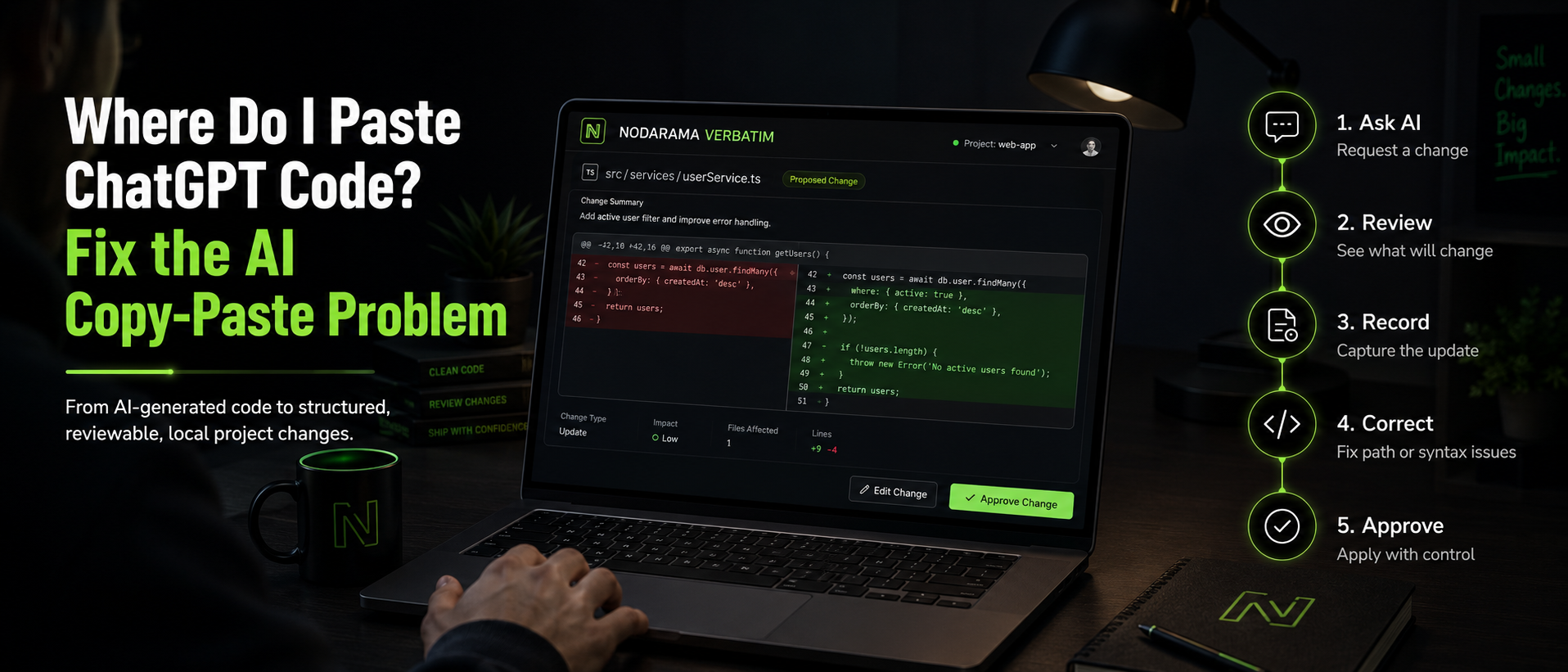
Stop Copying and Pasting AI Code — Use an AI Code Recorder Instead
Stop copying and pasting AI code.
Copy-paste AI coding feels fast. You ask ChatGPT, Claude, Gemini, Copilot, Perplexity, or a local AI tool for code. It gives you an answer. You paste it into your project. The feature changes. The screen updates. Progress feels immediate.
Then the project starts to drift. Files get overwritten. Context disappears. Fixes break other fixes. You forget which prompt created which change. Eventually, the workflow that saved time starts creating cleanup work.
Copy-paste was the first phase
Copying and pasting AI-generated code made sense when AI coding was experimental. It helped builders move quickly, test ideas, and learn what was possible.
But once AI becomes part of a real software workflow, copy-paste becomes too fragile. It does not create a reliable record. It does not protect structure. It does not tell you what changed or why.
The hidden cost
Manual AI code transfer often creates hidden debt. It feels convenient in the moment, but it can make the project harder to maintain later.
You may not notice the problem immediately. The damage usually appears after several rounds of changes, when the project becomes harder to explain, review, repair, or recover.
Where do I paste ChatGPT code?
That question is the hidden problem in AI coding. The code block is only part of the answer. The placement matters too.
You still need to know which file it belongs in, what it should replace, whether it needs imports or dependencies, and how to apply it without breaking the project.
What gets lost
When AI code is copied from a chat window into a project, the relationship between instruction and implementation gets weak.
The builder may still know the goal, but the project may no longer show the path. That makes authorship harder to prove, decisions harder to review, and mistakes harder to unwind.
Why chat history is not enough
Chat history can show what was discussed. It does not reliably show what was applied, where it landed, what was replaced, or whether the final project still matches the instruction.
A real AI coding workflow needs more than a conversation. It needs recorded, reviewable code changes.
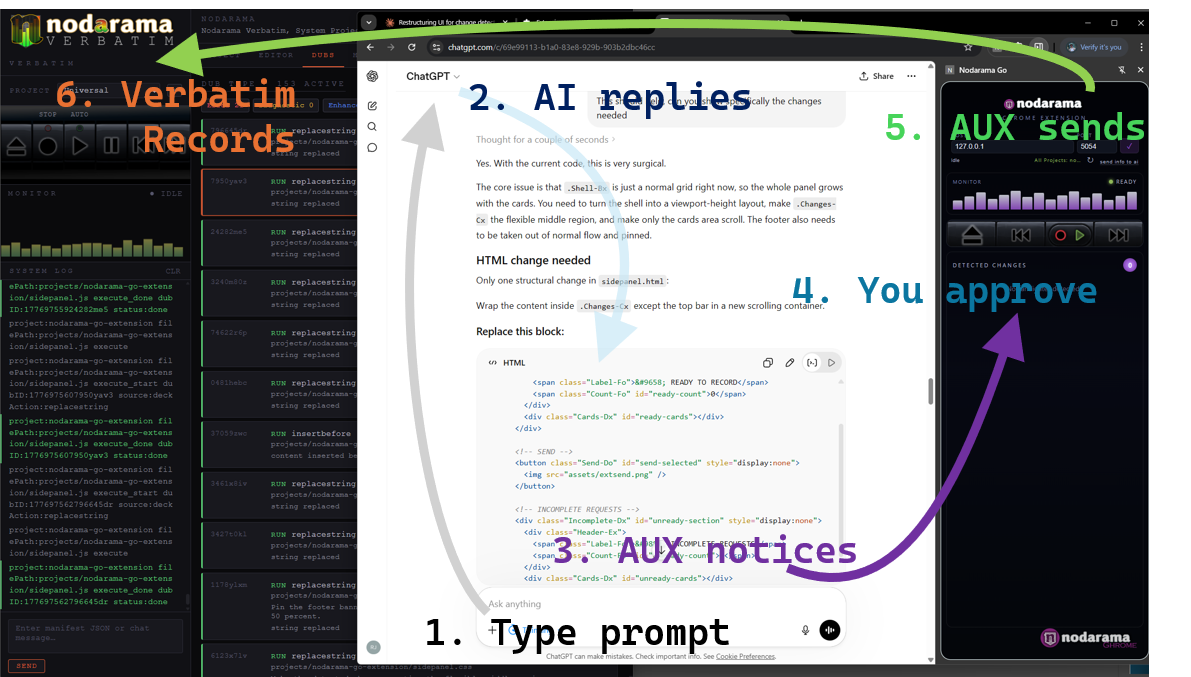
AI can generate the code. Nodarama Verbatim helps capture, organize, review, and record what changed before copy-paste chaos becomes project drift.
Common copy-paste failures
- Wrong file placement
- Overwritten working code
- Missing imports or dependencies
- Broken brackets, tags, or functions
- CSS changes affecting the wrong section
- Backend routes or config files breaking unexpectedly
- No clear record of what changed or why
The missing workflow
A safer AI coding workflow needs to answer a few basic questions before the code changes your project.
- What file should change?
- What kind of change is this?
- What exact code should be replaced, inserted, or rewritten?
- Can the change be reviewed first?
- Can the change be recorded?
- Can you recover if something goes wrong?
What an AI Code Recorder protects
How Nodarama Verbatim helps
Nodarama Verbatim is an AI Code Recorder for builders who want to use AI without losing control of the work.
Verbatim helps turn AI coding from scattered snippets and manual copy-paste into recorded, reviewable code changes. It gives builders a clearer record of what changed, where it belongs, and how the project evolved.
From code block to change request
Verbatim is built around structured change handling. A useful AI code change needs more than a block of code.
It needs a task, an action, a file path, and a payload. That means the change can be reviewed, recorded, corrected, and applied more deliberately than a blind paste.
The Verbatim workflow
Why serious builders should care
AI makes code generation easier. That part already happened. The next advantage is not producing more code faster. It is keeping control of the code being produced.
If five builders can generate similar apps in minutes, speed alone is not enough. Originality comes from the builder’s judgment, direction, and ability to maintain authorship over the work.
For beginners and non-coders
If you are new to coding, copy-pasting AI code can feel like the only option.
But it also puts a lot of pressure on you. You may not know whether AI gave you a full file, a partial function, a replacement block, a dependency, or a snippet that needs adaptation.
Verbatim gives AI-assisted builders a safer way to move from conversation to project change.
Works with your AI workflow
Nodarama Verbatim is not about forcing you into one AI tool.
You can still use ChatGPT, Claude, Gemini, Perplexity, Copilot, local models, or other AI tools in your workflow.
Verbatim focuses on the part most AI tools leave messy: getting AI-generated code into your real project with structure.
Use AI without losing the thread
The future of AI-assisted development is not just faster code generation. It is recorded, reviewable, builder-led software creation.
Stop copying and pasting AI code as if the chat window is your development system. Use a workflow that gives you authorship, control, and receipts.
Why copy and paste when you can record it Verbatim?
Try Nodarama Verbatim