AI Code Recording Features
Automatic AI code capture for recorded, reviewable local code changes.
Explore the systems that make Nodarama Verbatim useful for AI-assisted builders: AI code recording, automatic AI code capture, reviewable changes, diagnostics, restore support, and transparent local execution. Already downloaded? This page is your guide.
Same AI, better transfer.
Nodarama Verbatim is not another AI model. It is the local workflow layer that helps AI output become traceable, recoverable project work.
Record a Perfect Copy
Project overview, scoped files, dynamic lists, and intent signals help AI output land with fewer side quests and more accuracy.
Precision Transfer
Transparent Playback
System logs, AI logs, code diffs, run history, and restore points make each change easier to inspect, understand, and recover.
Clear Playback
Run That Back
Diagnostics, failed attempt tracking, repair suggestions, undo support, and recovery paths keep mistakes manageable — not session-ending.
Back That Up
The workspace map.
Hover the screen to see how the main areas fit together: controls, context, recorder activity, history, editing, and intake.
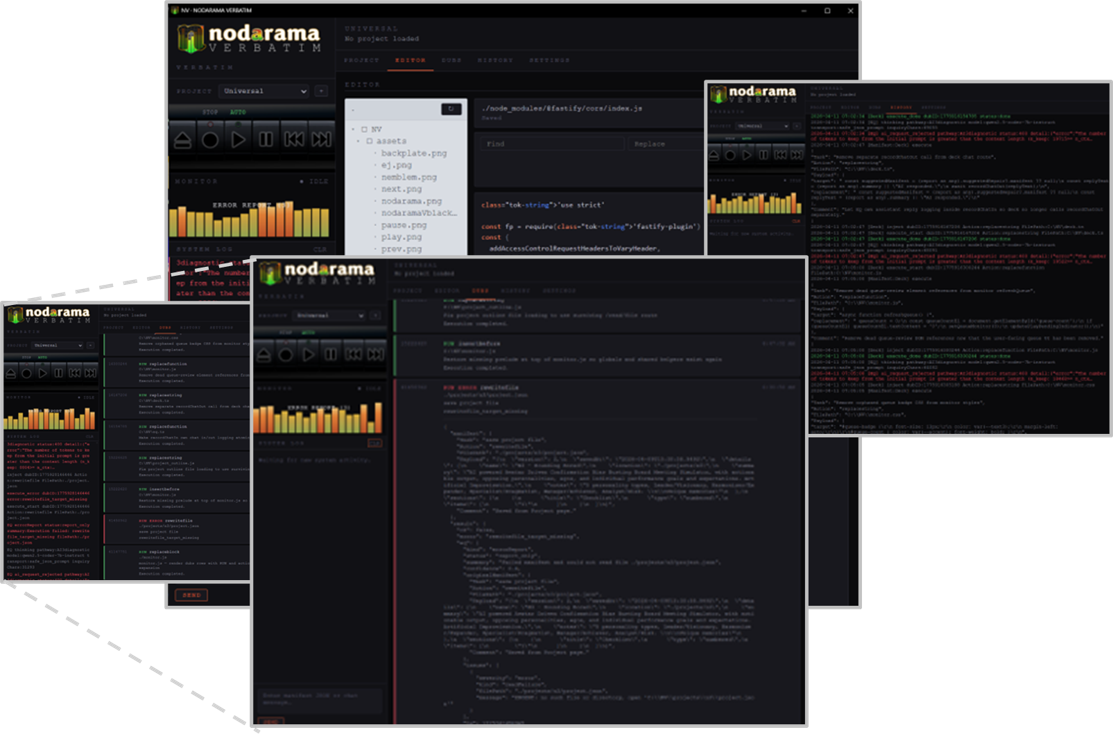
The system, screen by screen.
Open each section for a compact walkthrough of what that part of Verbatim is for.
User Interface
- Tape deck design makes record, play, eject, previous, and next feel immediate.
- EQ Monitor shows when the system is active, waiting, or processing.
- Deck controls support navigation and quick commands.
- System Monitor gives a quick activity summary.
- Chat Input works with local AI and as an intake for pasted AI code changes.
Projects
- Select or switch between active projects.
- Keep notes and summaries for the active project.
- Create dynamic lists and use them however your workflow needs.
- Flag lists as favourites for quick access.
- Flag lists as intention sheet items to include when sharing project info with AI.
Editor
- Basic editing functions are in early beta, with known display issues being corrected.
- Collapsed views make it easier to grab, share, and replace a specific section of code.
- Find and replace supports quick local corrections.
- Manual edits are logged, just like recorder activity.
Dubs
- Recent recording sessions are called dubs.
- Dubs include errors, diagnostics, enhancements, and successful recording sessions.
- Clear the quick view as often as you want; the full history is retained.
- Send proposed changes to the recorder after review, or allow automatic processing when configured.
History
- Review the full history of changes and activity.
- Filter by log type or view the whole timeline together.
- Use history for debugging, support, and reviewing what happened before a problem appeared.
- Restore and undo features are coming soon.
Settings
- Manage personal preferences, connections, and auto-play settings.
- Select AUX, AMP, LM Studio, or any combination that fits your workflow.
- Indicate custom project locations.
- Keep setup choices visible so your AI connection method stays understandable.
What you need to run Verbatim.
Nodarama Verbatim is a local desktop application. It runs on your machine, not in the cloud — your project files never leave your system unless you choose to share them.
- OS: Windows 10/11 or macOS 12+
- Runtime: Node.js 18 or higher
- Browser: Chrome or Chromium-based browser for AUX workflows
- Local AI optional: LM Studio for local model support
- Disk: app files plus your project files
Common Questions
Do I need to be an experienced developer?
No. Nodarama Verbatim is designed for people learning quickly with AI who want cleaner transfer into real project work. If you can write a prompt, you can use Verbatim.
Does Nodarama Verbatim replace my AI tools?
No. It works alongside the AI tools you already use — Claude, ChatGPT, Gemini, Copilot, or local models. Verbatim handles the transfer; your AI handles the thinking.
Can I use local AI models?
Yes. Nodarama Verbatim supports local model workflows including LM Studio-based setups. No internet connection required for the core transfer workflow.
Can I recover from a bad AI change?
Yes. Recovery, logging, restore support, and corrective workflows are core to the system. Every session creates a restore point before any change is written. You can roll back individual changes or entire sessions.
What if AI keeps changing the wrong files?
Use project scoping to explicitly tell Verbatim which files are in play. Scoped sessions prevent AI output from touching files outside the defined boundary.
Is my code sent anywhere?
No. Verbatim runs locally. Your project files stay on your machine. Only the content you explicitly send to an AI chat service leaves your system — and that's entirely in your control.
What languages and frameworks does it support?
Verbatim is language-agnostic. If your AI can write it and it lives in a text file, Verbatim can transfer it. HTML, CSS, JS, Python, PHP, and more — it reads and writes whatever your project uses.
How do I get support or report a bug?
Email info@nodarama.com with your system details and a description of the issue. As a beta product, your feedback directly shapes the next release.
Install now, or follow the setup guide first.
Ready to try Verbatim? Go straight to downloads. Still getting oriented? Start with the onboarding and install guide for the recommended first-run path.